 By
Choosing the right AI tool can save hours of work every week. However, finding the best option is not always easy. New AI platforms appear regularly, and existing tools receive new features.
Some AI tools help you write better content. Others can research topics, create images, analyze documents, build websites, and automate daily tasks. The challenge is finding tools that actually match your needs.
In this guide, we’ll explore The Best AI Tools for 2026 across different categories. We’ll explain what each tool does, who should use it, and where it offers the most value.
Whether you’re a student, freelancer, business owner, content creator, or beginner, there’s something useful here. You don’t need to learn every AI application available. You only need the right tools for your daily tasks.
What Are the Best AI Tools for 2026?
The best AI tools for 2026 are applications that help people complete tasks faster and work more efficiently. They use artificial intelligence to understand instructions, generate content, analyze information, and support creative projects.
Some applications work like personal assistants. Others focus on specific activities, such as video editing, programming, research, and automation.
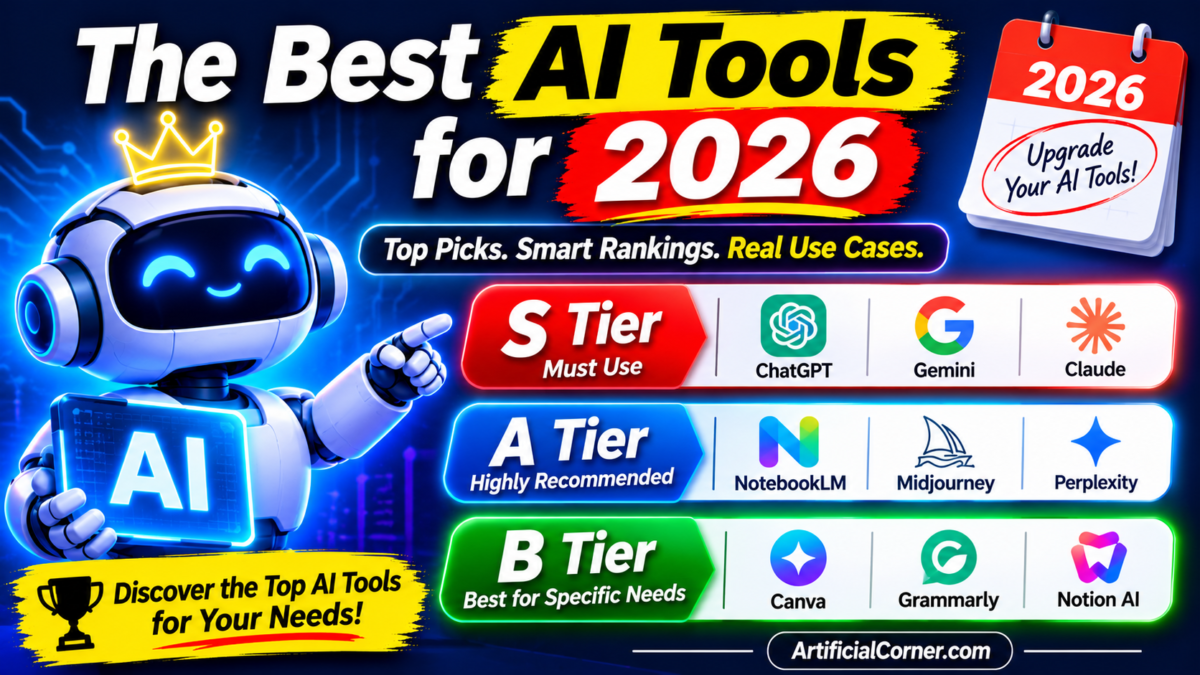
Here are some of the strongest options worth exploring:
| AI Tool | Best For |
|---|---|
| ChatGPT | Everyday tasks and general assistance |
| Claude | Writing, coding, and document analysis |
| Google Gemini | Research and Google Workspace |
| NotebookLM | Learning and document research |
| Perplexity | Online research and citations |
| Microsoft Copilot | Office productivity |
| Cursor | AI-assisted programming |
| n8n | Workflow automation |
| HeyGen | AI video creation |
| Canva AI | Graphic design and presentations |
These tools serve different purposes, so choosing one depends on your goals. Some offer free access, while others provide additional features through paid subscriptions.
S Tier: The Best AI Assistants Everyone Should Try
General-purpose AI assistants are excellent starting points for beginners. They can answer questions, explain difficult subjects, improve writing, and support everyday work.
You don’t need advanced technical knowledge to use them. Simply describe what you want, provide useful context, and review the response.
1. ChatGPT: Best Overall AI Assistant
ChatGPT is one of the most versatile AI assistants available today. It can help with writing, brainstorming, research, coding, and everyday questions.
You can also upload files, analyze spreadsheets, generate images, and explore complicated topics. Its available capabilities depend on your plan, settings, and supported features.
One useful feature is its ability to understand follow-up instructions. You can start with a simple question and gradually improve the result through conversation.
For example, website owners can use ChatGPT to create content outlines, understand SEO concepts, organize research, and review website information.
Students can ask it to explain difficult lessons using simple examples. Freelancers can use it to prepare proposals, improve emails, and organize client projects.
Best for: General productivity, learning, writing, research, and creative work.
Website: https://chatgpt.com/
2. Claude: Best AI Tool for Writing and Coding
Claude is another powerful AI assistant worth learning in 2026. It is particularly useful for long documents, detailed instructions, writing, and software development.
One of its strengths is handling complex tasks while maintaining context. You can provide a detailed brief and ask Claude to organize information into a clear structure.
Writers can use it to improve drafts, develop article outlines, and rewrite complicated explanations. Developers can explore code, understand projects, and work through technical problems.
Claude also offers specialized capabilities through features such as Projects and Artifacts. Availability depends on the current product plan.
If your daily work involves writing or programming, Claude deserves a place in your toolkit.
Best for: Long-form writing, coding, document analysis, and detailed projects.
Website: https://claude.ai/
3. Google Gemini: Best for Google Users
Google Gemini is a useful AI assistant for people who already work with Google’s services. It can support research, writing, learning, and creative tasks.
Its integration with Google’s ecosystem makes it especially interesting. Depending on your account and plan, supported features can connect with services such as Gmail and Google Docs.
Gemini can also help explain complicated topics and organize information. You can ask questions, upload supported content, and explore different ideas.
For students, it can make difficult subjects easier to understand. Business owners can use it for brainstorming, communication, and everyday planning.
Best for: Google users, learning, research, and creative assistance.
Website: https://gemini.google.com/
A Tier: AI Tools Most People Should Learn
General assistants are useful, but specialized applications can make certain tasks much easier. These tools focus on particular workflows instead of trying to handle everything.
4. NotebookLM: Best AI Tool for Learning and Research
NotebookLM is an AI research assistant from Google. It helps users understand information from their own sources.
You can add supported documents, PDFs, website sources, and other materials. NotebookLM then helps organize and explain the information.
For example, imagine studying a 100-page research document. Reading everything manually could take several hours.
Instead, you can upload the document and ask specific questions. The tool can summarize important sections and provide references to supporting sources.
It can also create audio overviews and other learning materials from supported sources. These features make complicated information easier to explore.
However, you should still check important claims against the original documents. Source-based answers can contain mistakes or misunderstandings.
Best for: Students, researchers, professionals, and people learning new subjects.
Website: https://notebooklm.google.com/
5. Perplexity: Best for AI-Powered Online Research
Perplexity is designed for people who want to research information online. It combines conversational AI with search-focused answers and source links.
Instead of opening dozens of search results, you can ask a question directly. Perplexity gathers relevant information and presents a summarized response.
This approach can save time during early research. It is especially useful when exploring unfamiliar subjects or comparing different ideas.
Content creators can use it to discover background information. Students can explore topics and find sources for further reading.
Remember that citations do not automatically make every answer correct. Always open important sources and confirm their information.
Best for: Online research, source discovery, and fact-checking.
Website: https://www.perplexity.ai/
6. Microsoft Copilot: Best for Office Productivity
Microsoft Copilot helps users work with Microsoft’s productivity ecosystem. It can support writing, summarization, brainstorming, and document-related tasks.
For people who regularly use Word, Excel, PowerPoint, and Outlook, Copilot can be particularly useful. Supported integrations depend on the subscription and organization settings.
You can use AI assistance to organize information and prepare first drafts. It can also help explain spreadsheet formulas and summarize lengthy documents.
For business teams, these features can reduce repetitive work. However, users should review generated content before sharing important documents.
Best for: Office users, business teams, and workplace productivity.
Website: https://copilot.microsoft.com/
Best AI Tools for Writing and Content Creation
Writing is one of the most common uses of artificial intelligence. Bloggers, marketers, freelancers, and business owners can all benefit from writing assistants.
However, producing text is only one part of good content creation. Research, accuracy, editing, and original experience remain important.
7. Grammarly: Best for Grammar and Writing Improvement
Grammarly helps people improve their writing by identifying grammar issues and suggesting clearer expressions.
It can help correct spelling, improve sentence structure, and adjust writing tone. These features are useful for professional emails, reports, articles, and everyday communication.
Beginners can use it to identify common writing mistakes. Experienced writers can use it as an additional editing step.
It should not replace careful proofreading. Some suggestions may change the original meaning or remove an author’s natural voice.
Best for: Grammar correction, proofreading, and professional communication.
Website: https://www.grammarly.com/
8. Jasper AI: Best for Marketing Content
Jasper is an AI writing platform focused on marketing and business content. It can support teams creating promotional material and brand-focused communication.
Marketing professionals can use it for campaign ideas, product descriptions, and social media drafts. It can also help organize different content formats.
Its value depends on the team’s content workflow and available features. You should always review its output before publishing.
Best for: Marketing teams, brand content, and promotional writing.
Website: https://www.jasper.ai/
Best AI Tools for Images and Graphic Design
Visual content plays an important role in digital marketing. Attractive images can improve presentations, social media posts, and website experiences.
AI image tools make visual creation more accessible. You can describe an idea and generate an image without advanced design skills.
9. Canva AI: Best for Beginners and Graphic Design
Canva is a popular design platform with AI-powered features. It helps users create social media graphics, presentations, posters, and marketing materials.
Its beginner-friendly interface makes designing easier. You can select a template, add your content, and adjust the design.
Canva also offers AI-assisted features for creating and editing visual content. Available tools depend on your plan and region.
Small businesses can use it for promotional graphics. Bloggers can create article thumbnails, while students can prepare attractive presentations.
Best for: Social media graphics, presentations, and beginner-friendly design.
Website: https://www.canva.com/
10. Midjourney: Best for Creative AI Images
Midjourney is an AI image-generation platform known for creating detailed visual artwork. Users describe the image they want and receive generated results.
It can produce different artistic styles, realistic scenes, illustrations, and creative concepts. This makes it useful for designers and visual content creators.
You can experiment with different prompts to improve the results. Small changes in lighting, composition, and style can produce very different images.
Always check the platform’s current subscription and commercial-use terms before using generated images in business projects.
Best for: Creative artwork, visual concepts, and professional-looking AI images.
Website: https://www.midjourney.com/
11. Nano Banana Pro: Best for AI Image Editing and Creation
Nano Banana Pro is worth exploring if you want to create or edit images using natural language instructions.
Instead of learning complicated editing software, you can describe the visual changes you want. This approach can make image creation easier for beginners.
Content creators can explore different image concepts and visual styles. Businesses can also experiment with promotional graphics and creative assets.
The final quality depends on the prompt, source image, and available generation features. Always inspect generated text and visual details before publishing.
Best for: AI image creation, editing, and visual experimentation.
Best AI Tools for Video and Audio Creation
Video production often requires several different skills. These include scripting, editing, recording, translation, and voice production.
AI-powered platforms can simplify parts of this process. They are especially helpful for creators who publish videos regularly.
12. HeyGen: Best for AI Video Translation
HeyGen is an AI video platform that supports video creation and translation workflows.
One interesting use is translating videos into different languages. This can help creators reach audiences beyond their original language.
For example, a business could prepare an English video and create versions for other markets. Supported features can include AI avatars and voice-related tools.
However, translated videos still need human review. Pronunciation, cultural meaning, and visual timing can affect the final experience.
Best for: Video translation, AI avatars, and business presentations.
Website: https://www.heygen.com/
13. ElevenLabs: Best for AI Voice Generation
ElevenLabs focuses on AI-powered voice generation and audio tools. It can help users create natural-sounding speech from written scripts.
Content creators can use it for narration and supported voice production tasks. Businesses can explore voiceovers for training materials and presentations.
Its usefulness depends on the required language, voice quality, and licensing conditions. Always check the terms before using generated voices commercially.
Best for: Voiceovers, narration, and AI audio production.
Website: https://elevenlabs.io/
Best AI Tools for Automation and Programming
AI is becoming useful beyond writing and research. It can also help developers build applications and automate repetitive business processes.
These tools are particularly valuable for people who want to save time on technical work.
14. n8n: Best for AI Workflow Automation
n8n is a workflow automation platform that connects different applications and services.
You can create workflows that move information between connected tools. It also supports AI-related automation and more advanced workflows.
For example, a business could collect form submissions and send information into another application. An automated workflow could then organize the data and notify the relevant team.
You can build workflows visually instead of writing every step manually. More advanced projects may still require technical knowledge.
Best for: Business automation, connecting applications, and AI workflows.
Website: https://n8n.io/
15. Cursor: Best for AI-Assisted Coding
Cursor is an AI-powered code editor designed to help developers work with software projects.
It can assist with understanding code, generating changes, and identifying potential problems. Developers can use natural language instructions during their programming workflow.
Beginners may also find it useful when learning how existing projects work. However, generated code still requires testing and review.
Cursor is particularly interesting for developers who want AI assistance directly inside their coding environment.
Best for: Software development, code editing, and programming assistance.
Website: https://cursor.com/
16. ChatGPT Codex: Best for AI-Assisted Software Development
Codex provides AI assistance for technical work and software development. It can help developers understand codebases, work on features, and review changes.
Instead of asking only for small code examples, users can work through larger development tasks. This makes it useful for building and maintaining projects.
Developers should still test generated changes and check security issues. AI assistance can speed up development, but it does not remove the need for technical judgment.
Best for: Coding projects, debugging, and software development workflows.
Website: https://chatgpt.com/
Best AI Tools for Different Types of Users
Not everyone needs the same AI applications. A student has different requirements from a professional developer or business owner.
Choosing tools according to your daily activities can prevent unnecessary subscriptions. Here are some practical starting points.
| User Type | Recommended AI Tools |
|---|---|
| Students | ChatGPT, Gemini, NotebookLM |
| Bloggers | ChatGPT, Claude, Grammarly |
| SEO Professionals | ChatGPT, Perplexity, Claude |
| Graphic Designers | Canva, Midjourney |
| Video Creators | HeyGen, ElevenLabs |
| Developers | Cursor, Claude, Codex |
| Business Owners | ChatGPT, Copilot, n8n |
| Researchers | Perplexity, NotebookLM |
| Freelancers | ChatGPT, Claude, Canva |
You don’t need to subscribe to every platform. Start with one general assistant and add specialized tools when necessary.
For example, a blogger might begin with ChatGPT for planning and Claude for editing. They can add Perplexity when research becomes an important part of their workflow.
How to Choose the Right AI Tool in 2026
Choosing an AI platform becomes easier when you understand your main requirements. Instead of following every popular recommendation, focus on the problems you want to solve.
Consider these important factors before selecting an application.
1. Identify Your Main Purpose
Start by identifying the tasks you perform most often. Do you write articles, create images, study documents, or manage business operations?
Your answer will help narrow down the available options. A research assistant may be more valuable than an image generator if you regularly prepare reports.
2. Compare Free and Paid Features
Many AI platforms offer free access with certain limitations. This gives beginners an opportunity to test their features before spending money.
Paid plans may provide higher limits, additional models, or advanced capabilities. However, more expensive subscriptions are not automatically better.
Test the free version first whenever possible. Upgrade only when the additional features provide real value.
3. Check Accuracy and Reliability
AI-generated information is not always correct. Even advanced models can misunderstand instructions or produce incorrect facts.
Check important information using reliable sources. This is especially important for business decisions, technical work, and educational material.
4. Consider Privacy and Data Security
Before uploading private documents, understand how the platform handles user information. Check its privacy settings, data policies, and business protections.
Avoid sharing passwords, financial details, or confidential information without understanding the risks. Businesses should also review their internal data policies.
5. Choose Tools That Fit Your Workflow
The best application should make your existing work easier. It should not create unnecessary steps or require constant switching between platforms.
Try combining a few tools that complement each other. A simple workflow can often deliver better results than using ten different applications.
How Beginners Can Start Learning AI Tools
If you’re completely new to artificial intelligence, don’t try to master everything immediately. Learning one application properly is more useful than testing dozens without understanding their features.
Start with a general AI assistant such as ChatGPT, Claude, or Gemini. Ask simple questions and practice writing clear instructions.
Next, explore a specialized tool related to your interests. Students can try NotebookLM, while bloggers can experiment with writing and research applications.
You can follow this simple learning path:
- Learn how to write clear AI prompts.
- Practice using one general AI assistant.
- Explore file uploads and research features.
- Test a specialized tool for your main activity.
- Build a repeatable workflow for everyday tasks.
- Review AI-generated results before using them.
Consistency is more important than learning everything quickly. Spend a little time practicing each day and gradually explore advanced features.
Frequently Asked Questions About the Best AI Tools for 2026
1. What are the best AI tools for 2026?
Some of the strongest options include ChatGPT, Claude, Gemini, NotebookLM, Perplexity, Canva, Cursor, and n8n. Each application serves a different purpose, including writing, research, design, coding, and automation.
2. Which AI tool is best for beginners?
ChatGPT, Gemini, and Claude are good starting points for beginners. Their conversational interfaces make it easier to ask questions and learn new concepts without programming knowledge.
3. What is the best free AI tool in 2026?
There is no universal winner because free features and usage limits vary. ChatGPT, Gemini, Claude, NotebookLM, and Perplexity are useful starting options with free access.
4. Which AI tool is best for content writing?
Claude and ChatGPT are useful for content planning, drafting, editing, and research assistance. Grammarly can provide an additional layer of writing improvement.
However, writers should add original insights, verify facts, and edit AI-assisted content before publishing.
5. Which AI tool is best for students?
NotebookLM is particularly useful for understanding uploaded study materials. ChatGPT and Gemini can also explain difficult subjects and support learning activities.
Students should use these tools to understand concepts rather than simply copy generated answers.
6. Can AI tools help small businesses?
Yes, AI applications can support many everyday business activities. They can help prepare emails, organize research, create marketing content, and automate repetitive workflows.
Small businesses should select tools according to their actual needs and budgets.
7. Do I need paid AI subscriptions?
Not necessarily. Free versions can handle many everyday tasks, especially for beginners.
Paid subscriptions become useful when you need higher usage limits, advanced features, or specific professional capabilities.
8. Will AI tools replace human writers and developers?
AI can automate parts of writing and programming, but human judgment remains important. Professionals still need to understand their audiences, check accuracy, solve complex problems, and make creative decisions.
Learning to work with AI can help people become more productive in their existing careers.
Final Thoughts: Which AI Tools Should You Learn in 2026?
The AI industry continues to develop, and new applications appear regularly. However, you don’t need to follow every launch or experiment with every available platform.
Start with one reliable general assistant, such as ChatGPT, Claude, or Gemini. Then explore specialized applications that match your interests and professional requirements.
If you enjoy research, try NotebookLM and Perplexity. For design, explore Canva and Midjourney. Developers can experiment with Cursor and Codex, while businesses can investigate n8n for automation.
Ultimately, The Best AI Tools for 2026 are the ones that solve real problems and improve your daily workflow. Focus on learning useful skills, checking results, and applying AI thoughtfully.
The goal isn’t to use more AI tools. It’s to make better use of the tools you already have.

5 comments